
Best Alexa Devices for Kids & Families (Plus Parental Controls)
Gadgets are always at the top of LalyDad’s wish list, so when Amazon started making Kids Edition versions of their Echo devices — with parental controls, screen time limits, and kid-friendly content built right in — we tried several out for real, in our own house, with our own kids. This isn’t a spec sheet pulled from a press release. Here’s what actually works, what to watch out for, and which device fits which kid and which room.
Affiliate links are used in this post for easy shopping.
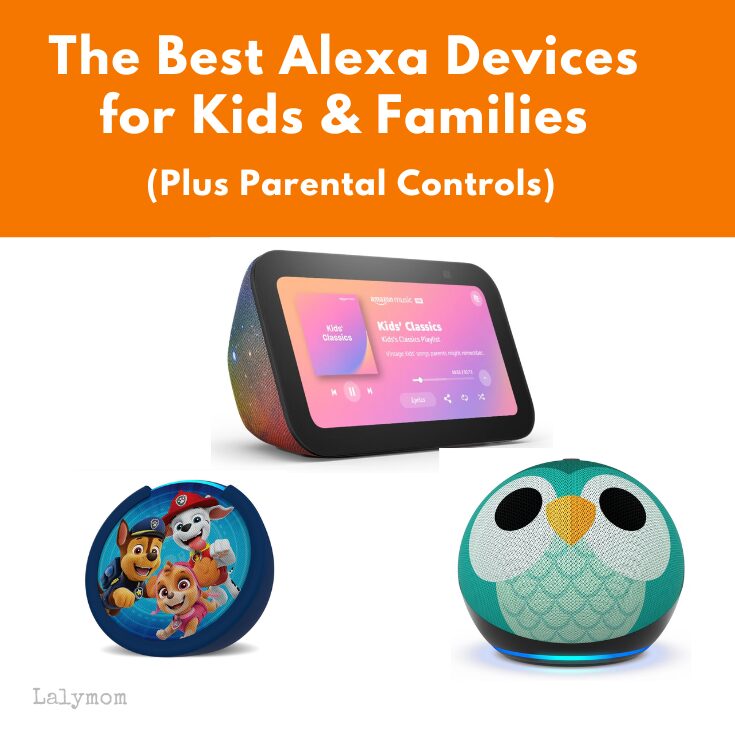
Let’s get into it, here is the quick basic rundown of the main amazon devices people use for their kids.
Comparing Amazon Kids Devices
Here’s a quick and easy guide to Amazon’s current Alexa-enabled devices. This includes smart speakers and displays each tailored for different needs and spaces.
Kids Edition Devices
Amazon makes dedicated Kids Edition versions of several Echo devices — same hardware inside, with parental controls, kid-friendly designs, and a full year of Amazon Kids+ included right out of the box.
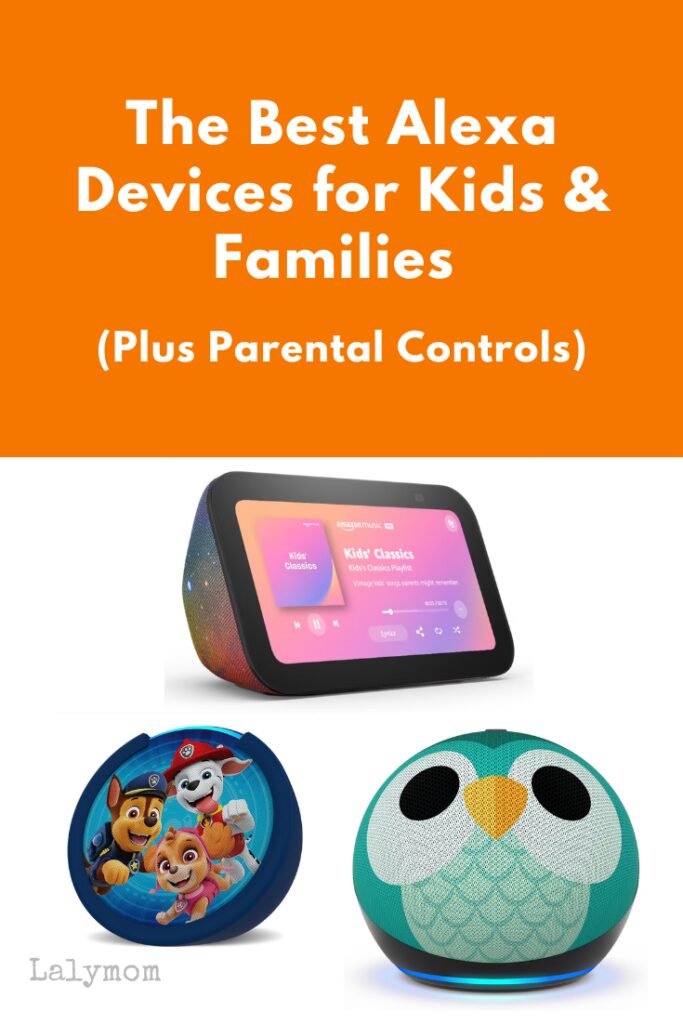
Echo Dot Kids
- Best for: A first smart speaker, bedrooms, playrooms
- Features: Same improved speaker as the regular Echo Dot, colorful kid-designed finishes (like Rainbow Swirl and Stardust), built-in parental controls, and includes 1 year of Amazon Kids+
- Price: Around $60 (frequently discounted — I’ve seen it as low as $38)
- Check out the cute designs including an owl, galaxy, rainbow and dragon.
Echo Pop Kids
- Best for: Small spaces on a budget
- Features: Same compact design as the regular Echo Pop, kid-friendly styling, parental controls
- Price: Around $50
- See the different designs featuring favorite licensed character designs, like Paw Patrol, Toy Story, Marvel Avengers, and more.
Echo Show 5 Kids
- Best for: A bedroom or playroom device where a screen actually helps — bedtime stories with illustrations, video calls to grandparents, homework help
- Features: Same 5.5″ HD display and camera as the regular Echo Show 5, kid-friendly design (like Galaxy), parental controls, and 1 year of Amazon Kids+ included (a $4.99/month value on its own)
- Worth knowing: Kids Edition devices typically come with a 2-year worry-free replacement policy — genuinely useful, since kids do drop things
- Price: Around $99.99
- Check out the different colors and galaxy design.
Subscription details: Amazon Kids+ is included for one yeat and then renews at roughly $7.99/month after the included first year, so budget for that if you plan to keep using it long-term. And since Amazon updates pricing and promotions often, [check current prices here] before you buy.
Parental Controls
After your free one year subscription ends, it is up to you if you continue with a paid subscription. You don’t need Amazon Kids+ to get basic Alexa kid protections. Free parental controls come standard once you set up a child profile. When Alexa recognizes your kid’s voice, it automatically filters explicit lyrics, blocks shopping, and gives age-appropriate responses on any compatible Echo in the house.
Here’s what you can control from the free Amazon Parent Dashboard:
- Bedtime lock: Automatically shuts off the device at whatever time you set, so it’s not glowing and buzzing at 10pm.
- Screen/activity time limits: Set a total daily limit, or break it down by activity type (say, 30 minutes of entertainment but unlimited reading).
- Learn First: Games and cartoons stay locked until your kid finishes a daily educational goal you set (reading time, math problems, etc.).
- Age filters: Content is automatically matched to the age range you set for that profile
- Activity reporting: See exactly what your kid has been doing, watching, and asking Alexa on their dashboard.
An Amazon Kids+ subscription adds content on top of the free controls access. With the paid subscription you’ll also have access to thousands of hours of curated books, shows, games, and educational skills — the subscription that comes free for the first year with Kids Edition devices, then renews around $7.99/month.
Before you buy: these controls are tied to a child profile, not the device itself. So a regular (non-Kids-Edition) Echo you already own can get most of this same protection for free, just by setting up a kid profile on it. The Kids Edition devices mainly buy you the design, the included first-year subscription, and that worry-free replacement warranty, not exclusive access to safety features.
Kids Alexa or Regular?
FAQ
Is Alexa safe for kids to use?
With a child profile set up, Alexa filters explicit content, blocks shopping, and gives age-appropriate responses. It’s a fun and useful tool for kids, but like any smart device, it’s your job as a parent to know what data it collects (see below). Using the parental controls helps a lot but it’s not totally hands-off.
Does Alexa record what my kids say?
Yes, like all voice assistants, Alexa records voice requests to process them. Worth knowing: in 2023, the FTC found Amazon had been keeping children’s voice recordings indefinitely and not fully honoring parents’ deletion requests, and Amazon paid a $25 million penalty and was required to overhaul its practices. Since then, you can (and should) go into the Alexa app’s Privacy settings and set recordings to auto-delete every 3 months, and periodically check that deletion requests actually clear both the app and account history.
What data does Alexa collect?
Here is a summary but please verify this regularly and read it yourself.
- Voice recordings and transcripts of what your child says to Alexa, used to process requests and improve voice recognition.
- Usage and activity data, such as which skills, shows, and content your child accessed. This is what populates your Parent Dashboard reports.
- Approximate location data, used for things like weather and local results.
What’s the difference between the regular and Kids Edition Echo?
Not much actually! The Kids Edition just adds a colorful design, a year of Amazon Kids+ included, and (on the Show 5) a 2-year replacement warranty. The parental controls themselves are free and work on any regular Echo too, once you set up a child profile.
Does Amazon Kids+ cost extra after the first year?
Yes, it renews at roughly $7.99/month. The core parental controls (bedtime lock, screen time limits, age filters) stay free either way. Kids+ is specifically for the extra curated books, shows, and games library.
Can a regular (non-Kids Edition) Echo have parental controls too?
Yes. If you already own a regular Echo, you can set up a child profile on it and get the same bedtime, screen-time, and content-filtering controls for free.
Can Alexa limit my kid’s screen time?
Yes, through the free Amazon Parent Dashboard. You can set a total daily limit, or break it down by activity type (like unlimited reading time but 30 minutes of entertainment), plus an automatic bedtime shutoff.
What Alexa Has Actually Been Like in Our House
Our kids are teens now, and theatre kids at that. So most nights it’s music or a podcast playing quietly while they wind down. When they were younger, it was funny audiobooks, corny jokes, and trivia questions that fueled their curiosity.
Alexa’s mostly a practical tools for us? It’s their alarm clock, and every morning it’s “Alexa, what’s the weather?” before deciding what to wear to school. It’s a small thing, but it’s also a life skill to make sure you’re dressed for the weather.
What originally felt like a fun bedtime-story gadget for a 6-year-old is now just a normal part of how our teenagers run their own mornings and nights. That’s honestly the best case for these devices. They’re not a toy you outgrow, they’re a tool that changes shape as your kids do.